AI Video Prompts: How to Write Better Prompts From Reference Videos
AI Video Prompts: How to Write Better Prompts From Reference Videos
You can have access to one of the most powerful AI video generators available and still get a disappointing result.
The problem isn't always the model.
Sometimes, it's the prompt.
You tell the AI:
"Create a cinematic video of a man walking through a city at night."
The result may look impressive.
But it probably won't look anything like the reference video you're trying to recreate.
The reason is simple.
A good-looking prompt isn't necessarily a good recreation prompt.
When you're working from a reference video, you aren't simply asking an AI model to create something beautiful.
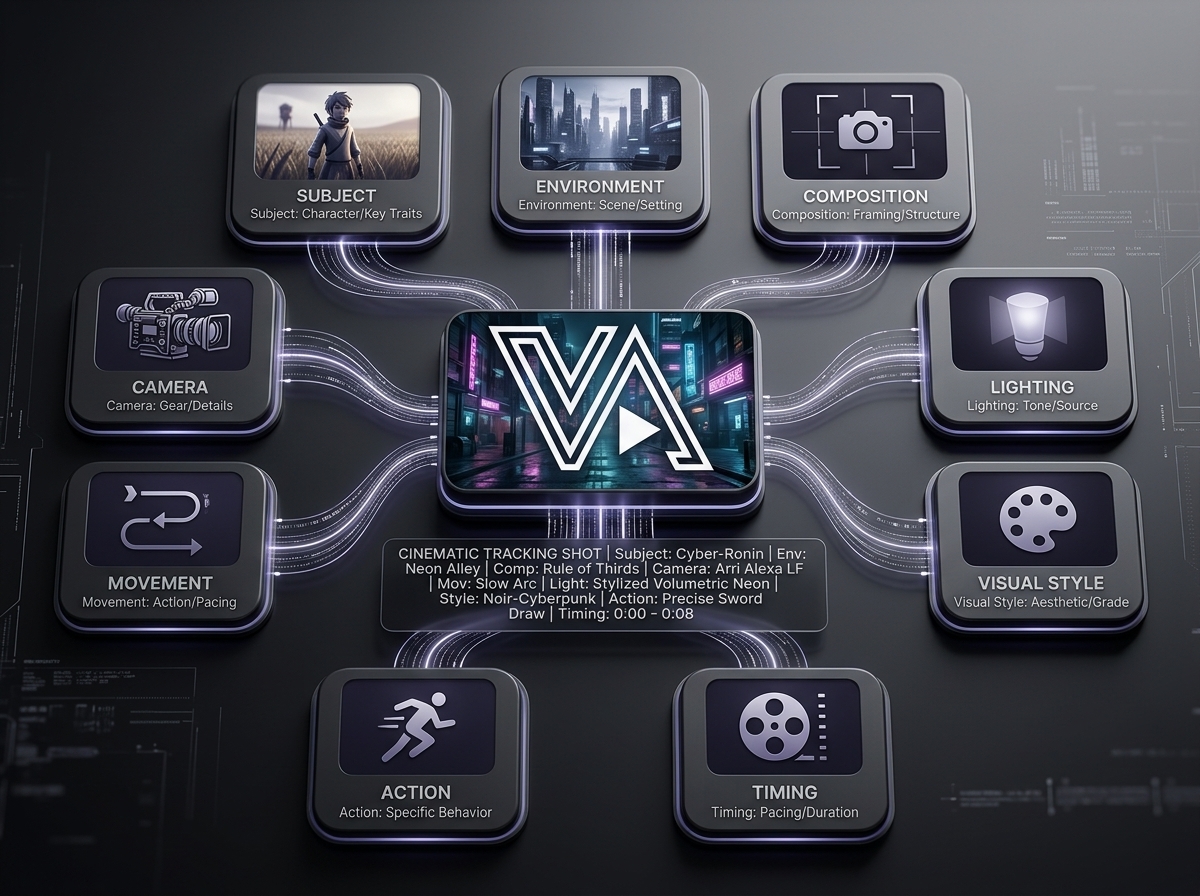
You're trying to communicate a specific visual sequence.
The subject.
The environment.
The camera.
The movement.
The lighting.
The composition.
The atmosphere.
The timing.
The style.
And the relationship between all of them.
That's where effective AI video prompts become important.
In this guide, we'll break down how to turn information from a reference video into prompts that give AI video-generation systems much clearer creative direction.
What Makes an AI Video Prompt Good?
A good AI video prompt doesn't simply contain lots of adjectives.
More words don't automatically mean better results.
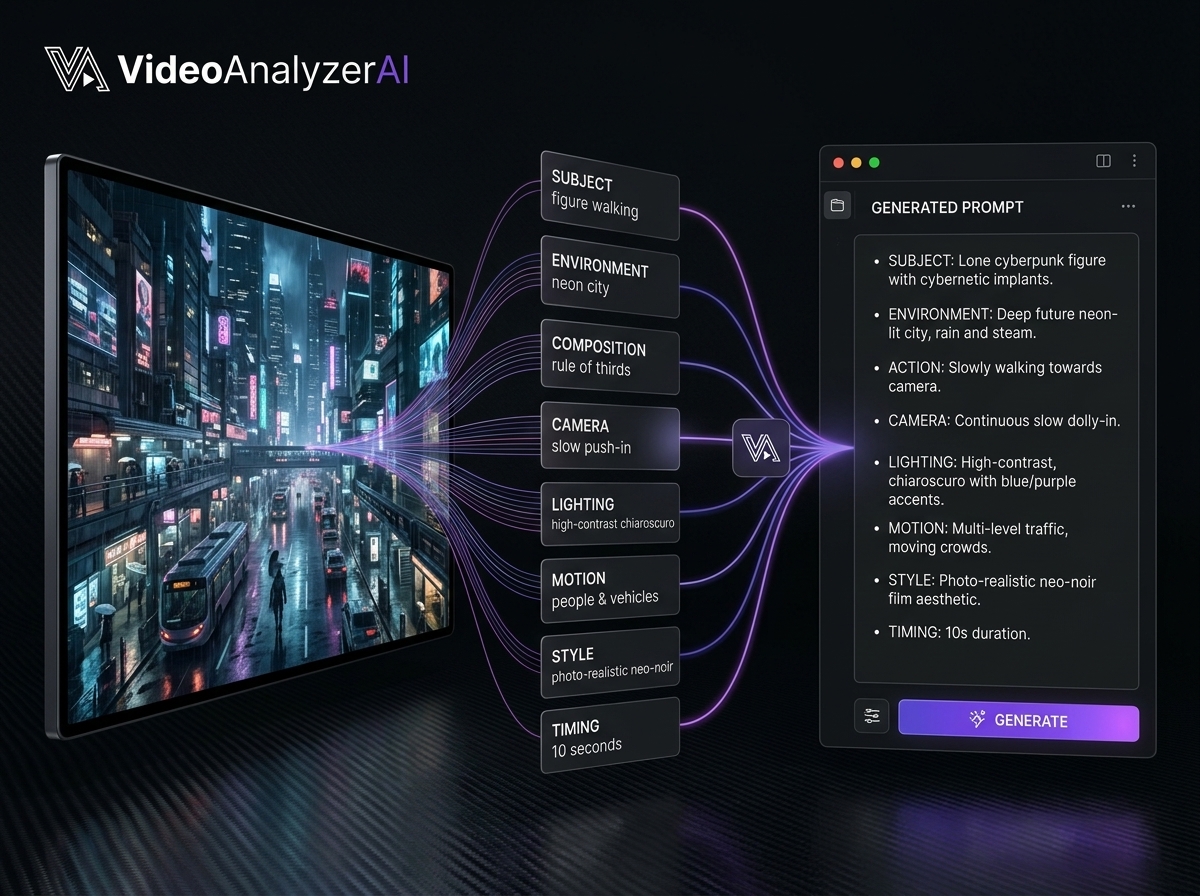
Instead, a strong prompt gives the generation model useful visual information.
Think about the difference between these two prompts.
Basic prompt
A cinematic woman walking through a beautiful city at night.
More useful prompt
A young woman walks slowly through a rain-soaked city street at night, framed in a medium tracking shot as the camera moves smoothly alongside her. Wet pavement reflects soft neon lights from surrounding buildings while shallow depth of field separates her from the background. The atmosphere is quiet and atmospheric, with subtle natural movement in her clothing and realistic reflections across the street.
The second prompt gives the model considerably more direction.
It describes not just the subject, but the visual language surrounding the subject.
The Biggest Mistake: Describing the Subject Instead of the Shot
One of the most common mistakes when writing AI video prompts is focusing almost entirely on the subject.
For example:
"A luxury watch sitting on a black table."
That tells the model what the object is.
But it doesn't explain how the video should present it.
A recreation-oriented prompt could instead describe:
A luxury mechanical watch resting on a dark polished surface, captured in an extreme close-up as the camera slowly pushes toward the watch face. Controlled directional lighting creates sharp highlights across the metal edges while soft reflections move across the glass. The background falls into deep shadow with shallow depth of field, creating a premium cinematic product-commercial aesthetic.
Now the model has information about:
Subject
Environment
Framing
Camera
Movement
Lighting
Materials
Depth
Style
That's a much stronger foundation.
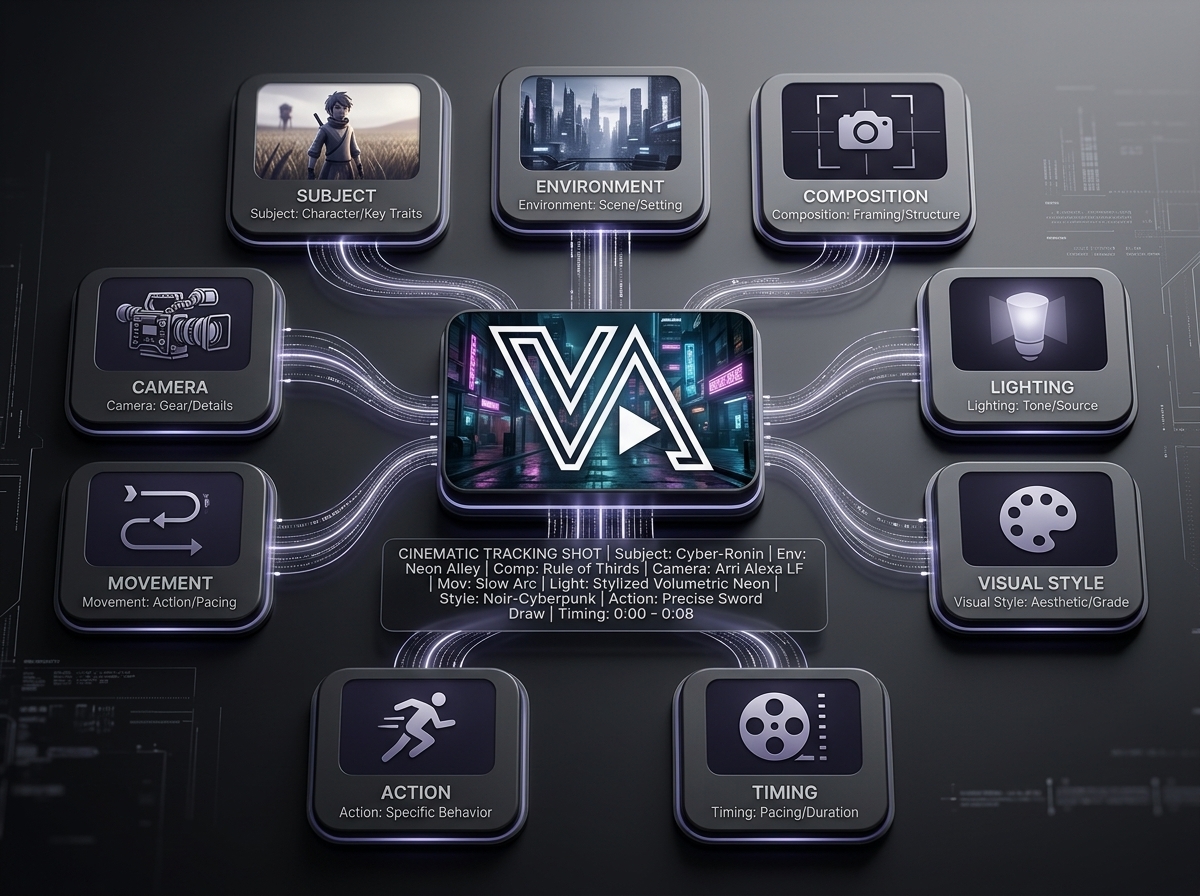
A Practical Framework for AI Video Prompts
A useful starting structure is:
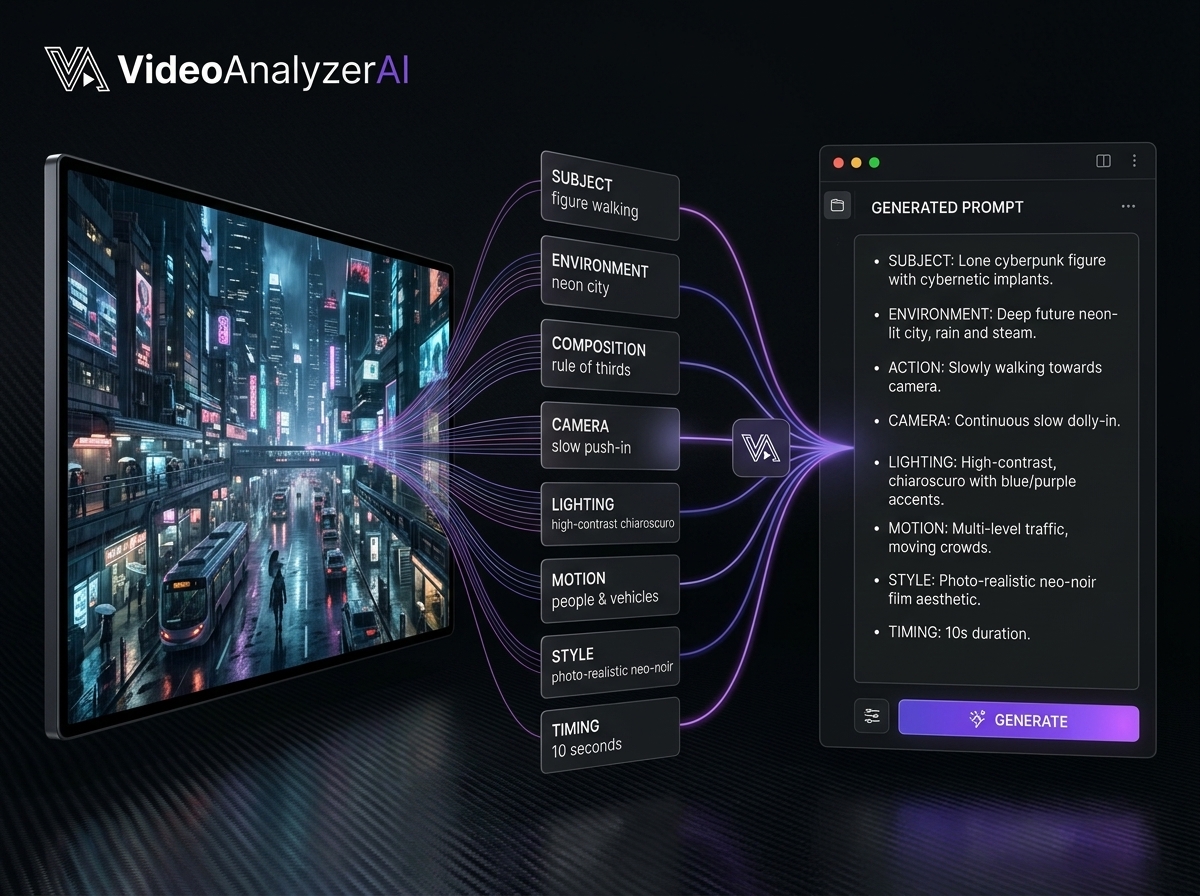
Subject + Environment + Composition + Camera + Movement + Lighting + Style + Action + Timing
You don't necessarily need every component in every prompt.
But thinking through these categories helps prevent important visual information from being forgotten.
Let's break them down.
1. Subject
Start with the primary subject.
This could be:
A person
Product
Animal
Vehicle
Building
Landscape
Character
Object
Group of people
Describe the characteristics that actually matter to the shot.
For a person, that might include:
Clothing
Age range
Pose
Appearance
Expression
Position
Direction
For a product:
Shape
Material
Color
Surface
Position
Orientation
Don't overload the prompt with irrelevant details.
Focus on what the camera needs to communicate.
2. Environment
Next, describe where the action happens.
Instead of:
"A man walks."
Consider:
"A man walks through a narrow rain-soaked urban alley surrounded by dark brick buildings and distant neon signage."
The environment establishes context.
It also affects:
Lighting
Reflections
Depth
Atmosphere
Motion
Composition
When recreating a reference, environmental details can be just as important as the subject.
3. Composition
Composition tells the model how the scene is arranged inside the frame.
Consider:
Wide shot
Medium shot
Close-up
Extreme close-up
Center framing
Rule of thirds
Symmetrical composition
Negative space
Foreground elements
Background depth
For example:
"A wide symmetrical composition places the subject directly in the center of the frame, with architectural lines leading toward the subject."
That's much more useful than simply saying:
"Make it cinematic."
4. Camera
Camera direction is one of the most important components of an AI video prompt.
Ask:
Where is the camera?
And:
What is the camera doing?
You might use:
Static camera
Slow push-in
Pull-out
Tracking shot
Dolly shot
Pan
Tilt
Crane movement
Handheld movement
Orbit
Low-angle shot
High-angle shot
Over-the-shoulder shot
For example:
"The camera slowly tracks alongside the subject at waist height."
That gives the generation model a much clearer instruction.
5. Movement
AI video isn't just about where things are.
It's about how they move.
Describe:
Subject movement
Camera movement
Object movement
Environmental movement
Speed
Direction
Interaction
Compare:
"A woman walks through the room."
with:
"The woman walks slowly toward the window while her coat moves naturally with each step as the camera tracks backward in front of her."
The second describes the motion relationship between the subject and camera.
That distinction can make a significant difference.
6. Lighting
Lighting can completely change the visual result.
Describe:
Light source
Direction
Intensity
Hard or soft light
Shadows
Highlights
Color temperature
Reflections
For example:
"Soft warm window light falls across the subject from the left while the background remains slightly underexposed."
This is much more actionable than:
"Beautiful lighting."
When recreating a reference, try to identify what the lighting is actually doing.
7. Style
Style should describe observable characteristics rather than relying on generic words.
Instead of:
"Make it cinematic."
Consider:
"Moody high-contrast visual style with restrained colors, shallow depth of field, soft atmospheric haze, subtle film grain, and controlled highlights."
You can still use the word cinematic, but supporting it with specific characteristics gives the model more information.
8. Action
What exactly happens during the shot?
Be specific about the action.
For example:
"The subject slowly turns toward the camera."
is more useful than:
"The subject interacts naturally."
If an action is important to the reference, describe:
Starting position
Movement
Direction
Interaction
Ending position
This helps the generated sequence maintain a logical progression.
9. Timing
Timing is particularly important when recreating a reference.
Consider whether the action happens:
Immediately
Slowly
Gradually
In a single continuous movement
In stages
With a pause
With acceleration
For example:
"Over the first two seconds, the camera slowly pushes forward before stopping as the subject looks toward the lens."
Now the prompt contains temporal direction.
The Difference Between a Description and a Recreation Prompt
This distinction is worth remembering.
A description tells you:
what you see.
A recreation prompt communicates:
what should be generated and how it should look and move.
For example:
Description
A woman stands beside a car at sunset.
Recreation prompt
A woman stands beside a dark luxury car on an open road during golden hour. Wide cinematic composition with the woman positioned slightly off-center, the vehicle occupying the foreground. The camera slowly pushes forward as warm low-angle sunlight creates long shadows and golden highlights across the car's body. Gentle wind moves her clothing while the distant landscape remains softly blurred.
The second version contains the visual instructions required to recreate the shot.
Why Reference Videos Are So Valuable
When you're writing a prompt from memory, you have to imagine all of these details yourself.
A reference video gives you something concrete to analyze.
You can examine:
The exact framing
Camera movement
Subject position
Lighting
Background
Motion
Timing
Color
Visual style
Instead of inventing a visual direction, you're extracting one.
That changes the workflow from:
Idea → Prompt → Generation
to:
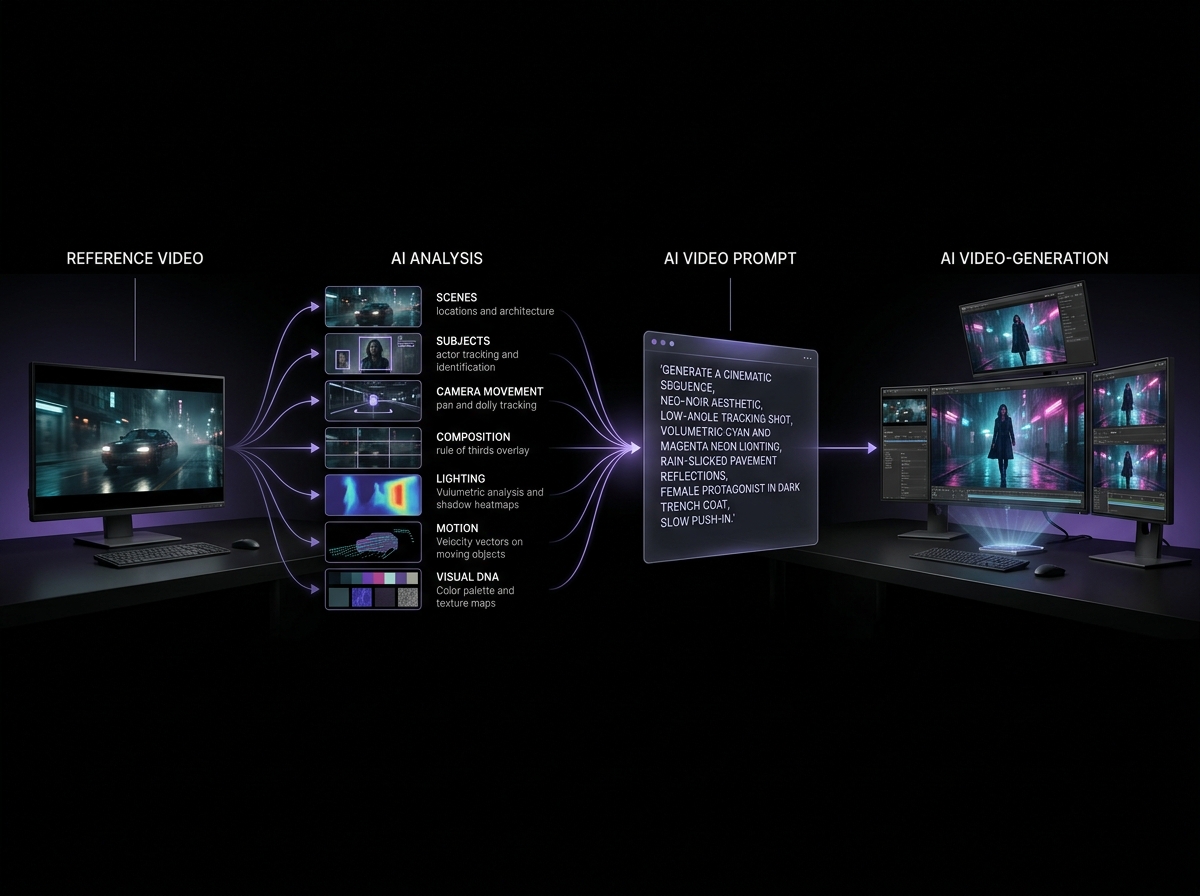
Reference → Analysis → Prompt → Generation
The second workflow gives you considerably more information to work with.
Turning a Reference Video Into AI Video Prompts
Here's a practical process you can use.
Step 1: Watch the Reference
Watch the entire video without trying to write the prompt immediately.
Understand the overall concept first.
Ask:
What is this video trying to communicate?
Step 2: Break It Into Shots
Identify meaningful changes in:
Camera
Location
Subject
Composition
Action
Each major change can become a separate shot.
Step 3: Analyze Each Shot
For every shot, identify:
Subject
What is being shown?
Environment
Where is it happening?
Composition
How is the frame arranged?
Camera
Where is the camera?
Movement
What is moving?
Lighting
How is the scene illuminated?
Style
What makes the shot visually distinctive?
Timing
How quickly does everything happen?
Step 4: Build the Prompt
Combine the relevant information into a natural instruction.
Don't simply paste every observation into one giant paragraph.
Prioritize the details that matter most to the shot.
Step 5: Generate
Use the prompt with your chosen AI video-generation workflow.
Different platforms may interpret prompts differently, so you may need to adjust the structure depending on the system you're using.
Step 6: Compare
Place the generated result next to the reference.
Don't ask only:
"Does it look good?"
Ask:
"What is different?"
Maybe the subject is correct but the camera is wrong.
Maybe the composition is right but the movement is too fast.
Maybe the scene is accurate but the lighting is completely different.
This makes refinement much easier.
Don't Try to Fix Everything at Once
One of the most useful habits in AI video prompting is identifying the specific failure.
Suppose your generated video has:
Correct subject
Correct environment
Correct lighting
Wrong camera movement
Don't rewrite the entire prompt.
Focus on the camera instruction.
For example:
"The camera tracks smoothly alongside the subject at a constant distance."
This targeted approach makes prompt refinement much more systematic.
Maintaining Consistency Across Multiple Shots
Longer AI videos introduce another challenge:
consistency.
A character can look different from one shot to another.
A product can change shape.
The environment can drift.
The visual style can become inconsistent.
One solution is to establish a set of anchor characteristics that remain consistent across your prompts.
For example:
Character anchors
Clothing
Hair
General appearance
Accessories
Environment anchors
Location
Architecture
Color palette
Time of day
Visual anchors
Lighting style
Camera language
Color treatment
Overall atmosphere
Then change only the elements that need to change from shot to shot.
Reference Images Can Strengthen Your Prompts
Text isn't always the best way to communicate appearance.
When supported by your generation workflow, reference images can help establish:
Character appearance
Product design
Clothing
Environment
Composition
Color
Style
A useful workflow can therefore combine:
Reference Video + Visual Analysis + Reference Images + AI Video Prompts
This gives the generation process multiple forms of visual guidance.
Why "Cinematic" Isn't Enough
"Cinematic" has become one of the most overused words in AI prompting.
The problem isn't the word itself.
The problem is that it can mean almost anything.
Instead of relying entirely on:
cinematic, beautiful, stunning, realistic
describe the characteristics you actually want.
For example:
"Slow dolly movement, shallow depth of field, soft directional lighting, controlled highlights, subtle atmospheric haze, restrained color palette, realistic motion."
Now the model has concrete visual information.
Don't describe the feeling alone. Describe the visual decisions that create the feeling.
AI Video Prompting for Different Types of Shots
Different shots require different priorities.
Product Commercials
Focus on:
Product appearance
Materials
Reflections
Camera movement
Lighting
Surface
Premium composition
Fashion Videos
Focus on:
Clothing
Model movement
Body positioning
Camera movement
Fabric motion
Lighting
Environment
Cinematic Storytelling
Focus on:
Character
Environment
Emotion
Composition
Camera
Lighting
Action
Timing
Social Media Videos
Focus on:
Immediate visual hook
Subject
Framing
Fast movement
Composition
Pacing
Visual clarity
The best prompt structure depends partly on what the shot is trying to accomplish.
A Reusable AI Video Prompt Formula
When you don't know where to start, use this:
[Subject] + [Action] + [Environment] + [Composition] + [Camera movement] + [Lighting] + [Visual style] + [Motion details] + [Timing]
For example:
A young woman in a flowing black coat walks slowly through a rain-soaked city street at night, surrounded by reflective pavement and distant neon signs. Medium tracking composition with the subject slightly off-center as the camera moves smoothly alongside her. Cool directional lighting creates subtle highlights across the wet surfaces while the background remains softly blurred. Moody high-contrast cinematic aesthetic with restrained colors and natural fabric movement, unfolding as one continuous slow-paced shot.
Use the formula as a starting framework—not a rigid rule.
How AI Video Analysis Makes Prompting Easier
If you're starting from a reference video, manually extracting all of these details can take time.
This is where AI video analysis can help.
Instead of watching the same footage repeatedly and trying to remember every detail, an AI analysis workflow can help identify:
Scenes
Shots
Subjects
Camera movement
Composition
Lighting
Motion
Style
Timing
Visual DNA
Those observations can then become the raw material for your prompts.
In other words:
Analysis gives you the ingredients.
Prompting turns those ingredients into instructions.
And generation turns those instructions into video.
From Reference Video to Generation Prompt
The complete workflow can look like this:
1. Find a reference
↓
2. Analyze the video
↓
3. Break it into shots
↓
4. Identify visual DNA
↓
5. Extract the important visual decisions
↓
6. Build shot-specific AI video prompts
↓
7. Generate the shots
↓
8. Compare against the reference
↓
9. Refine the specific differences
↓
10. Assemble the final sequence
This workflow is much more deliberate than repeatedly changing random words in a prompt and hoping the result improves.
How VideoAnalyzerAI Can Fit Into the Process
The hardest part of reference-based AI video creation often happens before generation.
You need to understand what you're looking at.
VideoAnalyzerAI is designed around that stage of the workflow.
Instead of starting from a blank prompt field, you can start with a reference video and use AI to extract the visual information that matters for recreation.
The resulting analysis can help you understand the video's:
Scene structure
Camera language
Visual style
Motion
Lighting
Composition
Visual DNA
Prompt requirements
That gives you a more structured starting point before moving into your preferred AI video-generation tools.
If you haven't already, you can first learn how the broader video-to-prompt process works, then use the analysis workflow to build stronger recreation prompts.
Common AI Video Prompting Mistakes
Using vague adjectives
Words like "beautiful," "amazing," and "cinematic" provide limited direction by themselves.
Better: describe the visual characteristics that create the desired result.
Making the prompt unnecessarily long
A massive prompt isn't automatically a better prompt.
Better: prioritize the information that actually affects the shot.
Ignoring camera movement
A correct subject with the wrong camera can completely change the result.
Better: explicitly describe camera position and movement when they matter.
Ignoring timing
Video is temporal.
Better: explain how actions unfold when timing is important.
Trying to recreate an entire complex video with one prompt
Complex sequences often contain multiple visual decisions.
Better: break the video into meaningful shots.
Changing everything during refinement
Randomly rewriting the entire prompt makes it difficult to understand what improved.
Better: identify the specific mismatch and modify that component.
The Future of AI Video Prompting
As AI video models become more capable, prompting will continue to evolve.
But one principle will remain important:
Better creative direction produces better-controlled generation.
The goal isn't necessarily to write the longest prompt.
It's to communicate the right information.
A strong AI video prompt acts almost like a miniature director's brief.
It tells the generation system:
What is happening.
What the camera sees.
How the camera moves.
How the subject moves.
How the environment looks.
How the light behaves.
What visual language should be maintained.
And how the moment unfolds.
Final Takeaway
AI video prompting isn't about finding a magic combination of words.
It's about understanding the visual result you want and communicating the important decisions clearly.
When working from a reference video, the strongest workflow is:
Reference → Analysis → Shot Breakdown → Prompt → Generation → Comparison → Refinement
Start with the reference.
Understand the visual decisions.
Turn those decisions into structured prompts.
Then generate.
Because the difference between a generic AI video and a convincing recreation often isn't the idea.
It's the direction.
Frequently Asked Questions
What are AI video prompts?
AI video prompts are written instructions used to tell an AI video-generation system what visual content, movement, camera behavior, environment, lighting, style, and action to generate.
How do I write a good AI video prompt?
Start with the subject and action, then describe the environment, composition, camera movement, lighting, visual style, motion, and timing when relevant. Prioritize specific visual information over vague adjectives.
Can I create an AI video prompt from a reference video?
Yes. You can analyze the reference video, break it into shots, identify the important visual characteristics, and convert those observations into generation-ready prompts. Try VideoAnalyzerAI for FREE
What should an AI video prompt include?
A useful framework is subject, environment, composition, camera, movement, lighting, style, action, and timing. Not every prompt needs every element.
Why do my AI video prompts produce different results from my reference?
Your prompt may describe the subject without capturing important elements such as camera movement, composition, lighting, motion, timing, or visual style. Those details can have a major effect on the final result. Try VideoAnalyzerAI for FREE
Should AI video prompts be long?
Not necessarily. A concise prompt containing the right visual information can be more useful than a very long prompt filled with generic descriptions.
Can AI analyze a reference video and generate prompts?
Yes. AI video-analysis systems can extract information from reference footage and use that information to create structured prompts for video-generation workflows. Try VideoAnalyzerAI for FREE
Related Reading
Continue your reference-video workflow with:
AI Video Analysis: How to Analyze Any Video for AI Recreation
And if you're starting from a reference and want to understand the complete process:
Video to Prompt: How to Turn Any Reference Video Into an AI Video Prompt
For the practical recreation stage:
How to Recreate an AI Video From a Reference Video
Have a reference video but don't know how to turn it into a usable AI prompt?
Start with the video. Let the analysis reveal the visual decisions. Then build from there.
Comments
Sign in to leave a comment.
No comments yet — be the first to comment.